Your requirements live in Confluence. Or Notion. Your team talks in Slack, or Microsoft Teams, or a Mattermost instance running behind your own firewall. Your AI tooling runs in the cloud, except when your compliance team says it can't. And somewhere in the middle of all of that sits your test management, expected to tie it together.
The honest truth about enterprise QA is that you don't get to design a clean stack from scratch. You inherit one. Requirements in one system, conversations in another, CI in a third, and a quality team holding the whole thing together. The more places your work spans, the more valuable it is when your test management reaches into each of them.
For Q2, we worked along two lines at once: make Qase fit the systems you already use, and make the AI inside it good enough to trust with a first pass. Here's what shipped.
Pillar 1: Traceability from the requirement to the defect
Qase has linked test cases to requirements in issue trackers like Jira, GitHub, and GitLab for a long time. The piece that was missing was documentation tools. A lot of teams keep their requirements in Confluence or Notion, and those connections didn't exist yet. This quarter we built both, as full two-way integrations.
Notion. Notion gets the same depth as Confluence: real two-way linking, generation, traceability, and defect creation. Link Notion pages to test cases, with a callout block added automatically on the Notion side so the connection is visible from both ends. Generate test cases from a Notion page using AI. Build a traceability matrix with Notion as the requirement source. And create defects directly in Notion databases, with field mapping pulled dynamically from your database schema, either from a defect detail view or from a failed test run. It's listed in the official Notion integration gallery too.
Confluence Cloud. Link Confluence requirements directly to test cases for end-to-end traceability. Generate test cases from a Confluence page using AI Test Designer, so requirements flow straight into Test Designer output. You get a traceability matrix across requirements, tests, and defects, plus defect linking between Qase and Confluence and a listing in the Atlassian marketplace. For a lot of enterprise teams, Confluence is the system of record for requirements, and this opens Qase up to all of them.
With both shipped, Qase now connects to the two documentation tools where modern teams keep requirements, from Atlassian-standardized enterprises to the Notion-first companies coming up behind them.
Two smaller traceability improvements round this out. Requirement coverage is now project-scoped: when a requirement is shared across projects, its coverage reflects the test cases in the project you're actually viewing. And the Requirements Traceability Report is now the Requirements Traceability Matrix (RTM), the term anyone from a compliance-driven environment will recognize on sight.
Pillar 2: Quality signal in the chat tool your team already uses
A failed run is only useful if the right people see it fast, and for most teams that means their own chat tool. Slack has been wired into Qase for a while. This quarter we added three more, so the tool your team already runs can carry Qase signal too.
You can pipe Qase events (test runs, defects, test case updates, milestone progress, review activity) into any of them, with per-project notification config across the board.
- Discord. Install from Apps, pick the server and channel, choose your events. For async-first engineering teams who run their day in Discord, QA signal now lands in the same channel where devs are already debugging and pairing.
- Mattermost. For security-conscious, regulated, and self-hosted teams who run Mattermost behind their own firewall. Qase events reach those channels while keeping data residency intact.
- Microsoft Teams. Events arrive as rich cards that summarize what happened and deep-link back into Qase. Setup is a Teams workflow webhook, the app from Apps in Qase, and a paste of the URL.
Microsoft Teams rounds out the major chat platforms. Different teams settle on different tools, from Slack and Discord to Mattermost in self-hosted shops and Teams across Microsoft-heavy enterprises. With all four supported, whichever one your team already runs, Qase can post into it.
Pillar 3: An AI test draft worth trusting
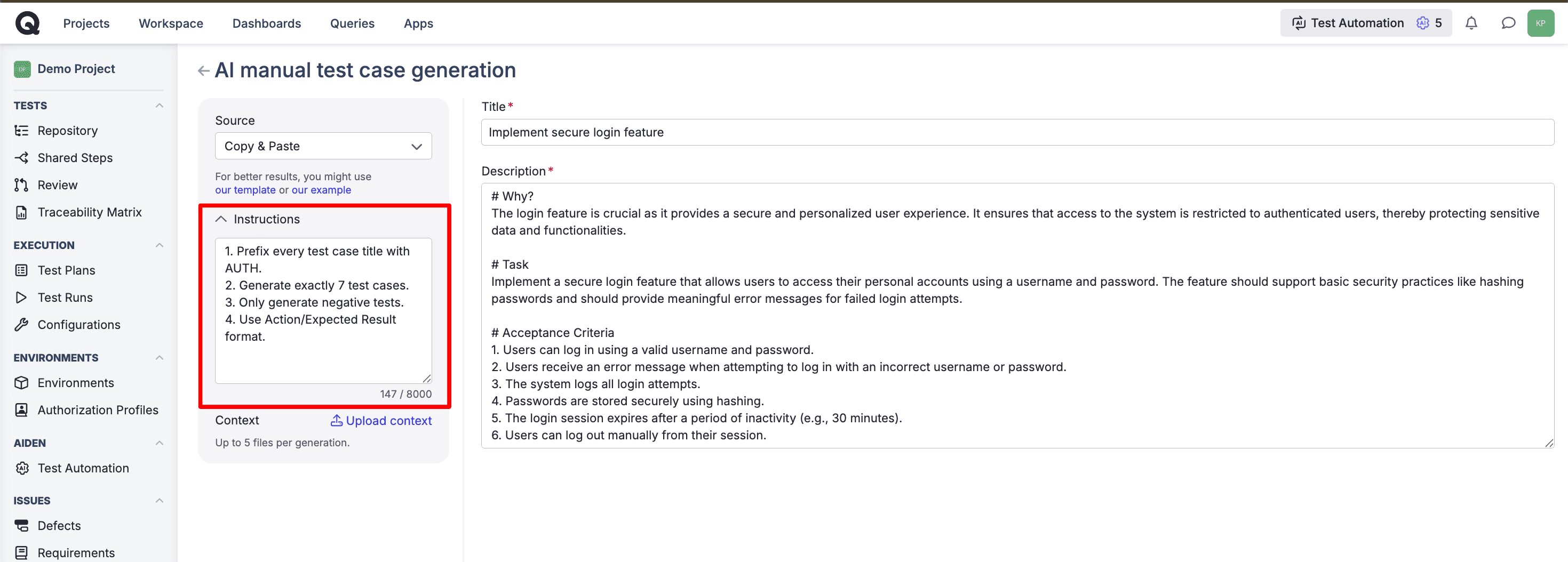
Test Designer is our AI test case generator. It drafts the cases and you review and edit them before they go anywhere, so the whole point of this quarter's work was making that first draft worth less of your editing time.
The biggest change is context support. A new Additional context field lets you guide generation with your own examples, naming conventions, glossary, or constraints. And Test Designer is now multimodal: attach screenshots (PNG, JPEG, WEBP) and Markdown documents, up to 5 files per request, all routed through a safety quarantine path before anything reaches the model.
The base output improved alongside it. The number of generated cases adapts to how complex your input is, and generation now draws on a checklist of established test design techniques (boundary conditions, negative cases, state transitions) plus a curated example, so the cases read like something a tester would actually write.
Test Designer is also easier to reach. It's now a top-level item in the side panel, and we renamed the old "Generate from requirements" option to simply Test Designer, since it now does more than generate from requirements.
Under the hood, generation got more dependable. If a request runs into a truncation or a parse issue, it retries automatically and falls back to a secondary model, so you reliably come away with a result.
Pillar 4: The first step into mobile testing
Until now, Qase's AI automation focused on the web. This quarter we extended it to mobile, starting with Android.
Android test automation is now available for any workspace with AI features turned on. Select mobile automation in the familiar Autotest Generator UI, upload your Android app bundle (.apk), pick a device model and OS version or take any available one, and generate a test you can run repeatedly on our cloud infrastructure. The flow is close to the web automation you already know. It covers native Android apps and frameworks that render to native widgets, including React Native.
Android is the first step. Broader mobile coverage is where we're headed next, and we'll shape it around what you tell us as you start automating real apps.
Pillar 5: Dashboards the whole team can read
A dashboard only earns its keep if someone who didn't build it can read it. We spent the quarter on exactly that.
Section Title Widgets let you break a dashboard into labeled sections with titles wherever you need them. For complex setups, that turns a long dashboard into clear sections a stakeholder can scan on their own, without you in the room to narrate it. You'll find it in the widget list under separators.
Advanced widget filtering is now live for all paid plans. You can build highly targeted widgets filtered by milestone, suite, assignee, custom fields, and more. That gives you the reporting people keep asking for: milestone-based views, suite-based views, dashboards tailored to a specific team, release, or owner.
For QQL visualizations, you can now change chart colors directly from the chart, so a dashboard can match how your team reads data and put the important series where the eye lands first.
And the first step toward analytics that anyone can use: natural language queries. Ask for what you want in plain English and Qase generates the QQL for you, so you can get to an answer without writing the query by hand. It's early, and we'll keep improving accuracy and coverage over the coming weeks. It's available to Business and Enterprise customers and consumes AI credits, since it's doing real generation work each time you ask.
Pillar 6: Built for how enterprises actually deploy
The least flashy pillar, and the one enterprise buyers care about most: does Qase work the way our infrastructure and our auditors require?
Qase's AI now runs on Dedicated clusters. Until this quarter, AI features were available on Cloud only, because credits were accounted for at the workspace level and Dedicated customers are organized differently. It's a quiet plumbing change with a loud result: AI parity between Cloud and Dedicated, and a green light for enterprise conversations that needed it.
Qase Tunnel is the supported way to connect your private and local apps to Qase's AI for test generation, reachability checks, and browser tests. It reaches any host on your network, so redirects and multi-host flows work end to end. It publishes nothing publicly, so only your workspace can reach it. One command starts it, and you pick the tunnel right in your environment settings. It's the successor to our earlier tunneling script.
What the quarter adds up to
We also crossed a usage milestone in May: more than 7 million calls to our Public API in a day. More teams are building on Qase as a platform, wiring it into the systems they run every day.
That's the thread running through all of Q2. The work of a QA team isn't contained in one app. It spans the requirements doc, the chat channel, the CI run, the dashboard the VP reads on Friday, and the deployment model your security team signed off on. This quarter was about making Qase reach into all of them. Everything in this post is live today.
Happy testing!